The following is an excerpt from my upcoming book, "The Linux Command Line" due out later this year.
To fully understand the printing features found in Unix-like operating systems, we first have to learn some history. Printing on Unix-like systems goes way back to the beginning of operating system itself. In those days, printers, and the way they were used was much different than today.
Printing In The Dim Times
Like the computers themselves, printers in the pre-PC era tended to be large, expensive and centralized. The typical computer user of 1980 worked at a terminal connected to a computer some distance away. The printer was located near the computer and was under the watchful eyes of the computer’s operators.
When printers were expensive and centralized, as they often were in the early days of Unix, it was common practice for many users to share a printer. To identify print jobs belonging to a particular user, a banner page was often printed at the beginning of each print job displaying the name of the user. The computer support staff would then load up a cart containing the day’s print jobs and deliver them to the individual users.
Character-based Printers
The printer technology of that period was very different in two respects. First, printers of that period were almost always impact printers. Impact printers use a mechanical mechanism to strike a ribbon against the paper to form character impressions on the page. Two of the popular technologies of that time were daisy wheel printing and dot-matrix printing.
The second, and more important characteristic of early printers was that printers used a fixed set of characters that were intrinsic to the device itself. For example, a daisy wheel printer could only print the characters actually molded into the petals of the daisy wheel. This made printers of the period much like high-speed typewriters. As with most typewriters, they printed using monospaced (fixed width) fonts. This means that each character has the same width. Printing was done at fixed positions on the page and the printable area of a page contained a fixed number of characters. Printers, depending on the model, most likely printed ten characters per inch (CPI) horizontally and six lines per inch (LPI) vertically. Using this scheme, a US letter sheet of paper is eighty-five characters wide and sixty-six lines high. Taking into account a small margin on each side, eighty characters was considered the maximum width of a print line. This explains why terminal displays (and our terminal emulators) are normally eighty characters wide. It’s to provide a WYSIWYG (What You See Is What You Get) view of printed output using a monospaced font.
Data is sent to a typewriter-like printer in a simple stream of bytes containing the characters to be printed. For example, to print an “a”, the ASCII character code 97 is sent. In addition, the low-numbered ASCII control codes provided a means of moving the printer’s carriage and paper using codes for carriage return, line feed, form feed and the like. Using the control codes, it’s possible to achieve some limited font effects such as bold face by having the printer print a character, backspace and print the character again to get a darker print impression on the page.
Graphical Printers
The development of GUIs lead to major changes in printer technology. As computers moved to more picture-based displays, so to did printing move from character-based to graphical techniques. This was facilitated by the advent of the low-cost laser printer which, instead of printing fixed characters, could print tiny dots anywhere in the printable area of the page. This made printing proportional fonts (like those used by typesetters) and even photographs and high quality diagrams possible.
However, moving from a character-based scheme to a graphical scheme presented a formidable technical challenge. Here’s why: the number of bytes needed to fill a page using a character-based printer can be calculated this way (assuming sixty lines per page each containing eighty characters):
60 X 80 = 4800 bytes
whereas, a three hundred dot per inch (DPI) laser printer (assuming a eight by ten inch print area per page) requires:
(8 X 300) X (10 X 300) / 8 = 900000 bytes
The need to send nearly one megabyte of data per page to fully utilize a laser printer was more than many of the slow PC networks could handle, so it was clear that a clever invention was needed.
That invention turned out to be the page description language (PDL). A page description language is a programming language that describes the contents of a page. Basically it says, “go to this position, draw the character ‘a’ in ten point Helvetica, go to this position...” until everything on the page is described. The first major PDL was PostScript from Adobe Systems which is still in wide use today. The PostScript language is a complete programming language tailored for typography and other kinds of graphics and imaging. It includes built-in support for thirty-five standard high quality fonts and the ability to accept additional font definitions at run time. At first, support for PostScript was built into printers themselves. This solved the data transmission problem. While the typical PostScript program was very verbose in comparison to the simple byte stream of character-based printers, it was much smaller than the number of bytes required to represent the entire printed page.
A PostScript printer accepted a PostScript program as input. The printer contained its own processor and memory (often times making the printer a more powerful computer than the computer it was attached to) and executed a special program called a PostScript interpreter which read the incoming PostScript program and rendered the results into the printer’s internal memory thus forming the pattern of bits (dots) that would be transferred to the paper. The generic name for this process of rendering something into a large bit pattern (called a bitmap) is raster image processor or RIP.
As the years went by, both computers and networks became much faster. This allowed the RIP to move from the printer to the host computer. This permitted high quality printers to be much less expensive.
Many printers today still accept character-based streams, but many low-cost printers do not. They rely on the host computer’s RIP to provide a stream of bits to print as dots. There are still some PostScript printers too.
Wednesday, February 18, 2009


Today's Site Updates
- Thanks to sharp-eyed readers Dmitry Zhuravlev-Nevsky and Alexander Wireen, I have corrected a bunch of typos in the "Writing Shell Scripts" section of the tutorials.
Saturday, February 14, 2009
Peanuts And Software
I really enjoy factory tours. I've always had a fascination with how things work and how things are made. Over the years, I've been on some great tours, Syracuse China, Corning Glass, Ben & Jerry's Ice Cream, and best of all, the (now defunct) General Motors assembly plant in Baltimore.
In the past, it seemed like many companies offered tours of their factories to the public, and why not? The great companies were truly proud of what they were doing and were happy to show you. This even applied to products whose production processes are better left unseen.
In recent years, factory tours have gotten harder to find. I don't know the exact reason for this. Maybe it's the fear of litigation, or a desire to keep everything proprietary, I just don't know.
The alert among you may have noticed the story in yesterday's New York Times announcing that the Peanut Corporation of America has filed for bankruptcy and will be going out of business. As you may know, Peanut Corporation of America recently gained notoriety for knowingly shipping peanut butter to its customers contaminated with salmonella resulting in over 600 reported illnesses and 9 deaths. As the scandal unfolded, reports surfaced of unsanitary conditions in its plants including cockroaches, leaking roofs, and a report of a dead rat in one of its peanut roasters.
Somehow, I don't think they offered a factory tour.
What does this have to do with software? Plenty. When you make something in the full light of day, it's a lot less likely that something horrible is going on under cover of secrecy. Open source code is like a factory tour for software. You can wander around and feel the pride of those who created it.
Proprietary software is different. What are they hiding? Does their program have "rats in the roasters?"
You'll never know.
In the past, it seemed like many companies offered tours of their factories to the public, and why not? The great companies were truly proud of what they were doing and were happy to show you. This even applied to products whose production processes are better left unseen.
In recent years, factory tours have gotten harder to find. I don't know the exact reason for this. Maybe it's the fear of litigation, or a desire to keep everything proprietary, I just don't know.
The alert among you may have noticed the story in yesterday's New York Times announcing that the Peanut Corporation of America has filed for bankruptcy and will be going out of business. As you may know, Peanut Corporation of America recently gained notoriety for knowingly shipping peanut butter to its customers contaminated with salmonella resulting in over 600 reported illnesses and 9 deaths. As the scandal unfolded, reports surfaced of unsanitary conditions in its plants including cockroaches, leaking roofs, and a report of a dead rat in one of its peanut roasters.
Somehow, I don't think they offered a factory tour.
What does this have to do with software? Plenty. When you make something in the full light of day, it's a lot less likely that something horrible is going on under cover of secrecy. Open source code is like a factory tour for software. You can wander around and feel the pride of those who created it.
Proprietary software is different. What are they hiding? Does their program have "rats in the roasters?"
You'll never know.
Friday, February 13, 2009
Followup On My Dell Inspiron 530N
Had a problem with the monitor that came with my recently purchased Dell 530N with Ubuntu. After a couple of hours, the monitor would get brighter and brighter until it reached maximum brightness and then after a few minutes of that, the lamp in the monitor would go out leaving me with a black screen. I could turn the monitor off for a few minutes (and presumably, let it cool) and it would work for another couple of hours.
I got tired of that (Hey! I'm trying to write a book here!) so I called Dell's Ubuntu support number (1-866-622-1947) and got connected to an overseas call center. The representative had me perform a simple test, reboot the computer and press F2 to get to the setup screen, then just let it sit and see if the monitor would fail again. This test would eliminate the possibility of a video driver issue. Sure enough, after about 30 minutes, it went out again. I called back and talked to another representative who was able to see what had transpired during the first call. She arranged for a replacement to be shipped overnight to me. A refurbished monitor arrived the next afternoon.
I'm pleased with the service. Their support staff was polite and professional, but I didn't have a chance to test their Linux skills.
Maybe next time.
I got tired of that (Hey! I'm trying to write a book here!) so I called Dell's Ubuntu support number (1-866-622-1947) and got connected to an overseas call center. The representative had me perform a simple test, reboot the computer and press F2 to get to the setup screen, then just let it sit and see if the monitor would fail again. This test would eliminate the possibility of a video driver issue. Sure enough, after about 30 minutes, it went out again. I called back and talked to another representative who was able to see what had transpired during the first call. She arranged for a replacement to be shipped overnight to me. A refurbished monitor arrived the next afternoon.
I'm pleased with the service. Their support staff was polite and professional, but I didn't have a chance to test their Linux skills.
Maybe next time.
Thursday, January 29, 2009
Adding Ubuntu-style sudo To Fedora 10
One of the neat things about Ubuntu is the absence of a discreet user account for root. This was an unusual idea when it was introduced a couple of years ago, and I myself, had some initial doubts about it. But that was then and this is now. I have come to really enjoy this feature.
I recently installed Fedora 10 on one of my test systems and decided to see what was involved in getting a similar feature in Fedora.
The sudo command is governed by a configuration file named /etc/sudoers. This file defines the users who are allowed to use sudo and precisely what commands they are allowed to execute with elevated privileges. I have written definitions for this before, so I took a look at the Fedora 10 sudoers files to see how to add myself to the list of users that can execute any command as root.
What I discovered was that the Fedora 10 sudoers thoughtfully provides the following lines:
## Allows people in group wheel to run all commands
# %wheel ALL=(ALL) ALL
This definition states that any user belonging to the group wheel will have full access to all commands. Just what the doctor ordered!
So this leaves me with two things to do:
The first task is pretty easy. I just fire up vi (as root) and edit /etc/sudoers. I only need to remove the leading pound symbol to make the change:
## Allows people in group wheel to run all commands
%wheel ALL=(ALL) ALL
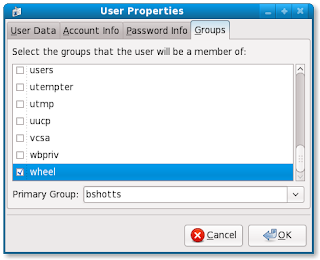
The second task is not very hard either. I bring up the graphical (yes, I'm cheating) user configuration tool and select my user account and press the "Properties" button, then select the "Groups" tab on the properties dialog. Scrolling to the bottom of the list, check the box labeled "wheel":
Press OK and we're done!
Here are a couple of questions for all you geniuses out there:
Have fun!
I recently installed Fedora 10 on one of my test systems and decided to see what was involved in getting a similar feature in Fedora.
The sudo command is governed by a configuration file named /etc/sudoers. This file defines the users who are allowed to use sudo and precisely what commands they are allowed to execute with elevated privileges. I have written definitions for this before, so I took a look at the Fedora 10 sudoers files to see how to add myself to the list of users that can execute any command as root.
What I discovered was that the Fedora 10 sudoers thoughtfully provides the following lines:
## Allows people in group wheel to run all commands
# %wheel ALL=(ALL) ALL
This definition states that any user belonging to the group wheel will have full access to all commands. Just what the doctor ordered!
So this leaves me with two things to do:
- Uncomment the line in the sudoers file to enable the definition.
- Add myself to the wheel group.
The first task is pretty easy. I just fire up vi (as root) and edit /etc/sudoers. I only need to remove the leading pound symbol to make the change:
## Allows people in group wheel to run all commands
%wheel ALL=(ALL) ALL
The second task is not very hard either. I bring up the graphical (yes, I'm cheating) user configuration tool and select my user account and press the "Properties" button, then select the "Groups" tab on the properties dialog. Scrolling to the bottom of the list, check the box labeled "wheel":

Press OK and we're done!
Here are a couple of questions for all you geniuses out there:
- How would you add yourself to a group using only the command line tools?
- What is the history and meaning the "wheel" group?
Have fun!
Subscribe to:
Posts (Atom)


 Posts
Posts

